
Divi Blog模块默认有两种布局:网格和列表,但默认的样式都不怎么好看,利用css优化列表布局,使用blog分类展示更美观。达到以下展示效果:
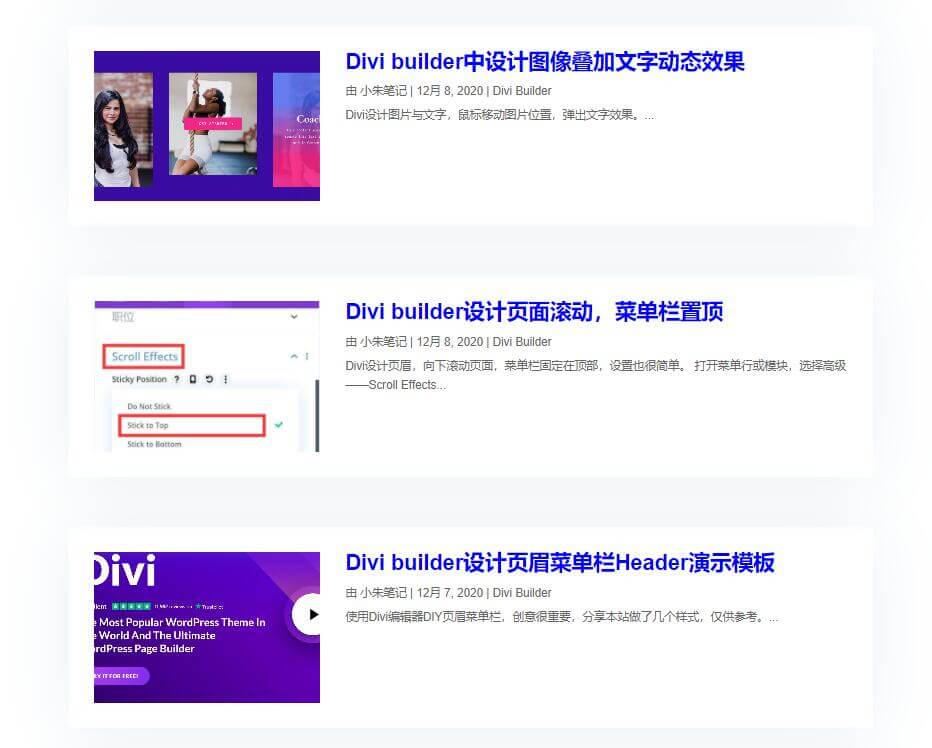
优化Divi Blog模块图像在左侧,内容在右侧
第一步:将Blog模块设置布局:列表(虽然默认非常难看,但通过以下CSS就可以改变效果)
第二步:设置CSS(如果你使用的是免费的Divi子主题,将代码放入style.css 文件中。否则,将代码放在Divi>主题选项>自定义CSS 代码框中。)
1、图片在左侧,内容在右侧CSS,(可以根据需要调整宽度)
/*add media query so changes only affect tablet and desktop*/

@media (min-width: 767px) {

/*set the image width*/

.entry-featured-image-url  {
width: 30%;
float: left;
margin-bottom: 0!important;
}

/*set the details width*/

.entry-title,
.post-meta,
.post-content {
width: 70%;
float: left;
padding-left: 30px;
}
}
2、添加以下CSS优化层次感,(可以根据需要调整)
/*style the individual posts*/

.et_pb_post {
box-shadow: 0px 2px 80px 0px rgba(160,190,212,0.22);
border-radius: 6px;
padding: 30px;
margin-bottom: 20px;
}
3、优化图片尺寸比例。就是在上面的第一个代码段中添加“ padding-top:30%”。复制下面的代码粘贴上去就可以了,(可以根据需要调整)
/*blog image aspect ratio square 1:1*/

.entry-featured-image-url {
  padding-top: 30%;
  display: block;
}

.entry-featured-image-url img {
  position: absolute;
  height: 100%;
  width: 100%;
  top: 0;
  left: 0;
  right: 0;
  bottom: 0;
  object-fit: cover;
}
把这三段css添加后,效果就出来了。
如果想把图片放右侧,自行修改css。
老哥,效果是出来了,不管标题还是什么,直接点不开,是什么问题,求教
可能是设置问题吧,好好检查吧
老哥,你这效果真心不错,可惜给了代码我也搞不出
老哥,不是吧,写了教程的,博客布局设置:列表。然后直接复制三个CSS代码粘贴:将代码放在Divi>主题选项>自定义CSS代码框中。
还没睡呐老哥,博客布局在哪里,没找到啊
刚购买学习使用DIVI是吧,哪就先熟悉DIVI吧。在DIVI>主题生成器中,DIY博客排版。
好的好的,多谢老哥了,我先研究研究哈